Tag

Powered By Blogger
Showing posts with label How to ?. Show all posts

Tuesday, 9 April 2013

How to stop time in Criminal Case Facebook Online Game ?

Criminal Case in Facebook is now one of the most playing game online. Many try to cheat , search for some kind of weird hacks... which doesn't work. Here, in this game each and every one does one mistake for sure. Easy trick to score High Score among your friends and this works for sure with no weird tools.


Yea, you can increase your Xp or money up to infinite by using Cheat Engines but there is ain't cheat for High Score. This trick I'm about to say is a Time Hack!!

Here's how you do it :

  • First, Log-in to  your Facebook Account.

  • Next open Criminal Case App

  • All you need to do is, try to play this game " full-screened mode "


Now the main stuff starts, when the game starts do the following :


Monday, 8 April 2013

How to sign in to multiple Facebook accounts at once ! New Method !

Facebook is a social networking site used by millions of people around the globe. So its easy to expect many people would be having 2 or more than 2 facebook accounts for different purposes.


Here's how you sign-in to multiple facebook accounts at once : There are two Methods :

  • Since you can access only one Account in one Internet Browser, you just need to have more Browsers.

Let's say that you signed in to one Account using Internet Explorer, and you am online in it. Now you just need to open  FireFox  to sign in to another account.


So just minimize "Internet Explorer" and open "FireFox" to sign-in other account. In this way you can be online using " 2 Browsers ".


__________________________________________________________________________________
  • You can use this method " Facebook Switch Accounts". First  Open " Google Chrome "
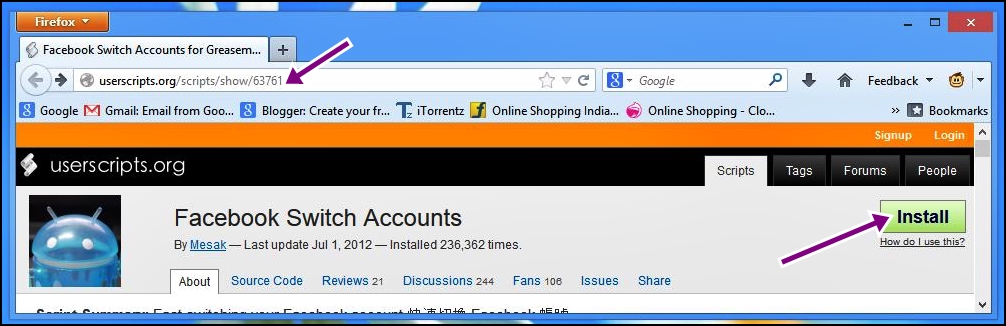
Now Go to this following site : http://userscripts.org/scripts/show/63761

On the Upper right corner, you will see " Install " click on it.


Google Chrome doesn't allow scripts to be installed directly, here's how you do it :


  • Click on "install" to download the script to your computer
  • Then Go to " Customize Google Chrome Button" at the right of the address bar > Settings > Extensions.
  • Now drag the "downloaded script" onto the extension page
  • And "customize it" and "install" the script .
Still if you are having trouble, click here http://userscripts.org/about/installing  for detailed explanation.
_________________________________________________________________________________

See below, to know how to install scripts in " FireFox " :

  • Open Firefox, search for  "Greasemonkey" add-on and install it. 


Restart FireFox, ( it's necessary) then on the address bar, paste this link 

Then Click on " Install " button.


Then " It says that it's a greasemonkey user script, click on install to use it ". Click on " Install "


Now Open " Facebook " on the right upper side you will see " Switch Accounts "  >
"Add Account " click on it.


Type "Account Name"and "Password", click on "OK". That's it.


Log-in to one account and when ever you want to use the other account, just click on
 Switch accounts > select the other account 


If you found this post helpful, please remember to share it. You can even bookmark this site for regular updates. 

Saturday, 6 April 2013

How to mount and install ISO game files using Deamon Tools ! Latest Tutorial !

Deamon Tools is popular software for mounting ISO files. Image files can mounted using many softwares and Deamon Tools is one of them. Since by default there is no software that can open ISO files, you will have to install Deamon Tools first.

Get Deamon Tools from here :
Filehippo: (Click Here)
Deamon-tools.cc : (Click Here)

Quick Steps to follow : 

1. Firstly Install " Latest Version " of Deamon Tool in your PC.


2. Once Deamon Tools is installed, by default your system use it to open ISO files. So you simply double click on the ISO file (.iso file). 


3. You can even manually mount ISO file, by clicking on DTLite.exe, (shortcut is available at your desktop screen)

  • Now click on this icon located in Image below. 


  • Then Locate the ISO file of the game and click on " Open". 

You will that under "Image Catalog" you required Game is ready to be mounted. Now "Right Click"  on it and click on " Mount ".


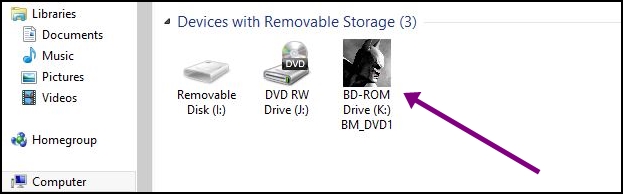
4. Now Open "My Computer", you will see that your required ISO File is mounted  under 
" Device with removable storage "


  • That's it, just "double click" on mounted ISO file , or "right click" > "Open" to view the contents in it.
 ________________________________________________________________________________

Some times, in middle of the installation it asks to insert another " DVD "  , that technically means to mount other ISO file, if the first time you mounted "Part A or DVD1"ISO file, now it's time to mount "Part B or DVD2".

Here's how you do it ? 

  • First "Right click" on mounted drive, then click on " Eject "   


  • Now, you will have to mount Part B ISo file, for that you can just double click on Part B ISO file and it mounts automatically.  

Then you will that "Installation will be going on" & this is how you do it when you have two files (DVD1 & DVD2) to install.

If this post on "Installing ISO game files using Deamon Tools" helped you, then please subscribe or bookmark this site. I promise to fill this site with more helpful posts.

Friday, 5 April 2013

Download Torrent via Internet Download Manager ( IDM ) ! Fastest Way !

In this tutorial, you will know how to download a torrent using Internet Download Manager (IDM) for better download speed.

This process includes only 3 steps :
1. Get a torrent,
2. Upload it in zbigz.com
3. Start downloading it with Internet Download Manager (IDM) 

Now In Detail : 

1. Firstly you will have to install IDM in your Computer. Once you are done you can go to http://torrentz.in/
http://thepiratebay.se/
http://kat.ph/search/.kickasstorrents/.


Search for a good torrent, get the once which is having good seeds > peers. Once you are fixed, click on " Get this torrent "or " Download Torrent ".

Tick the Option " Save File " and click on "OK". By default it will be stored in Downloads in your computer.


Check this post on How to Save Torrent Files ? If you are a starter.
________________________________________________________________________________

2. Now Go to http://www.zbigz.com/
 It's a bit torrent client that allows to download torrents online. 

 You can see the option "Upload .torrent file" click on it. Then select the torrent file, click on Open.


Then Click on " GO " Click on Free :),  then wait till it's preparing the torrent.


3. Once caching is Complete, click on "Download".


Again it asks for Free or Premium, click on " free "

That's it, your download is ready.


Downloading a torrent using Internet Download Manager is beneficial and fast. If you are having a good internet speed, surely you will observe a higher download speed.

So Next time, when you are downloading your favorite songs, movies or games, surely remember that you can download torrent using IDM.

So if you found this post useful, make sure you subscribe or bookmark this site. A lot more is to come. See you around in other posts.  


Friday, 15 February 2013

How to turn on SysMain for readyboost ?


After reading many forums and other sites, I decided to write a post on sysmain for readyboost. If you want to turn on Ready boost, you will first need to turn the Sysmain service back on.

Have you connected  pendrive and tried to use Ready Boost, to increase its performance. And it says  that  " This device cannot be used for ReadyBoost. "


Well, it's a simple problem, try using the steps below : 

1. Type Services, in Start. Right click on it and start it as " Run as Administrator ".


2. Locate the file Superfetch, click on " Properties ". 


3.  Under General, Check the Service Status : " Stopped ".  Make sure you set up Startup type : " Automatic " and click on " start " 


A pop up box opens, which normally take 20 sec to complete. That's it press okay once the service status is " started ".
  
Now Right click on pen drive or memory card, go to "properties" and click on " Ready Boost "


Tick the Option " USE this device" and check how much MB does windows recommend for Optimal performance. " IF you are using a 8Gb stick then dedicate 4Gb to it." 

Once you are done with the procedure, you will find a file named "Ready Boost" in your pendrive. 

That's it. Thanks for reading the post. If you are still facing problem, then click on this link to read the post : Readyboost Not Working

Check How to copy ISO files in Pendrive ?

Wednesday, 6 February 2013

How to Download English songs on Android Phones !


Today's Tutorial will show you how to download English songs on Android Phones. Well it's not that hard to find your required songs, it takes some time. 


Yes its simple as it look, just download Apps that have large database of English Songs, and just download them by one click. 

For your convenience, I have sorted out a list of Apps that you can use to download English songs  directly on Android Phones.You can easily find them in Google Play.
 
Here's the list :

a.) MP3 Music Download Best  :  You can search and download mp3 music from public domain through search engine. It's  a fast growing app, with good interface and everyday many millions are downloading and using. You will truly feel satisfied. 


                                                                                     - Average Rating : 4.3 -    

b.) Mp3 music download : Edit track lag and play them with art. You can manage music : Play.,add to., delete. Truly one of the best mp3 music downloader for android.  With more than 50,000,000 install, its skyrocketing. So want to download this app, which is used by that huge number of people. 

                                                                                                                                               - Average Rating : 4.5 -    

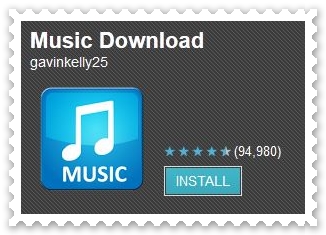
c.) Music Download : A must have app that lets you download thousands of music and mp3 to your SD card. It's easy to manage : categorize, share and delete and many more. And you can even make a ring tone out of your favorite music that's on your SD card.  Vast number of people have installed this app (50,000,000 install).

                                                                                                                                               - Average Rating : 4.3 -   

d.) GTunes Music Download  : Let's you download your music. It got a option of sharing music with your friends through social networking sites.  It got one of a kind music database.  Nearly 5,000,000 install, so if you feel like to download this app surely go for it.

                                                                                                                                               - Average Rating : 4.4 -   
That's it people, you can get the required songs from the above mentioned apps. Go on try those, all are available freely.  

Did you get the required song, well check this post on " Download 320 Kbps English Songs for Free " .
Related Posts Plugin for WordPress, Blogger...